Choosing the right CRM can feel overwhelming, but with a solid CRM Buying Checklist, you’ll cut through the noise and find the perfect fit for your business—fast, smart, and stress-free.

1. Define Your Business Goals and CRM Objectives

Before diving into software features, it’s crucial to align your CRM selection with your company’s strategic goals. A CRM isn’t just a digital Rolodex—it’s a growth engine. Without clarity on what you want to achieve, even the most advanced system can become a costly mistake.
Identify Key Business Challenges
Start by asking: What problems are you trying to solve? Are your sales teams missing follow-ups? Is customer data scattered across spreadsheets? Are marketing campaigns underperforming due to poor targeting? Pinpointing pain points helps you prioritize CRM functionalities.
- High customer churn? Look for strong customer service and retention tools.
- Low sales conversion? Prioritize lead scoring and pipeline management.
- Poor inter-departmental collaboration? Seek CRM platforms with robust team workflows.
According to Salesforce, companies using CRM report a 41% increase in sales productivity—when the system aligns with business needs.
Set Measurable CRM Goals
Define success with KPIs. For example:
- Increase lead conversion rate by 25% in six months.
- Reduce response time to customer inquiries to under 2 hours.
- Improve customer retention by 15% in one year.
“A CRM without clear goals is like a ship without a rudder—moving, but not necessarily in the right direction.”
These measurable outcomes will guide your CRM Buying Checklist and help evaluate vendor promises against real-world results.
2. Assess Your Team’s Needs and User Adoption Potential
No matter how powerful a CRM is, it’s useless if your team won’t use it. User adoption is the silent killer of CRM projects. Gartner reports that poor user adoption contributes to over 50% of CRM failures. That’s why your CRM Buying Checklist must include a deep dive into user experience and team readiness.
Involve Stakeholders Early
Bring together reps from sales, marketing, customer service, and IT. Each department has unique needs:
- Sales: Needs quick access to contact history, task reminders, and mobile functionality.
- Marketing: Requires campaign tracking, lead segmentation, and integration with email tools.
- Customer Service: Depends on ticketing systems, knowledge bases, and omnichannel support.
- IT: Cares about security, scalability, and integration capabilities.
Early involvement reduces resistance and ensures the final choice has buy-in across the board.
CRM Buying Checklist – CRM Buying Checklist menjadi aspek penting yang dibahas di sini.
Evaluate Ease of Use and Training Requirements
A complex CRM can slow down your team instead of speeding them up. Look for intuitive interfaces, drag-and-drop functionality, and minimal clicks to complete common tasks.
Ask vendors for a demo using your real-world scenarios. Can a sales rep log a call in under 30 seconds? Can marketing build a campaign workflow without coding?
Also, assess training resources. Does the vendor offer onboarding, video tutorials, and live support? Platforms like Zoho CRM provide free training academies, which can significantly boost adoption.
“The best CRM is the one your team actually uses every day.”
3. Analyze Core CRM Features and Functionality
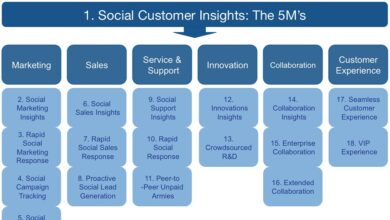
Your CRM Buying Checklist should include a detailed evaluation of essential features. Not all CRMs are created equal—some excel in sales automation, others in customer service. Match features to your business model.
Contact and Lead Management
This is the foundation. A good CRM should allow you to:
- Import and organize contact data from multiple sources.
- Track lead sources and assign ownership automatically.
- Segment contacts by behavior, demographics, or lifecycle stage.
- Duplicate detection to avoid data clutter.
Look for dynamic fields that adapt based on user behavior. For example, if a lead downloads a pricing sheet, the CRM should flag them as sales-ready.
Sales Pipeline and Automation
A visual sales pipeline helps teams track deals from prospect to close. Key features include:
- Customizable stages (e.g., Discovery, Proposal, Negotiation).
- Drag-and-drop deal movement.
- Automated reminders for follow-ups.
- Forecasting tools based on historical data.
Automation reduces manual entry and ensures consistency. For instance, when a deal moves to ‘Closed-Won,’ the CRM can trigger a welcome email and notify customer support.
HubSpot’s CRM, for example, offers free automation tools that scale with your business, making it a favorite for growing teams.
CRM Buying Checklist – CRM Buying Checklist menjadi aspek penting yang dibahas di sini.
Marketing and Customer Service Integration
Modern CRMs go beyond sales. They unify marketing and service functions:
- Email campaign tracking with open and click rates.
- Lead nurturing workflows based on user actions.
- Support ticketing with SLA tracking.
- Customer satisfaction (CSAT) surveys post-interaction.
If your business relies on repeat customers, choose a CRM with strong service cloud capabilities, like Salesforce Service Cloud.
4. Evaluate Integration and Scalability
Your CRM doesn’t exist in a vacuum. It needs to connect with your existing tech stack—email, calendar, ERP, e-commerce, and more. A CRM Buying Checklist must include integration compatibility and future growth potential.
Check API and Third-Party Integrations
Look for platforms with open APIs and pre-built connectors. Common integrations include:
- Email (Gmail, Outlook)
- Calendar (Google Calendar, Outlook)
- Marketing (Mailchimp, ActiveCampaign)
- Phone systems (Zoom, RingCentral)
- E-commerce (Shopify, WooCommerce)
Zapier compatibility is a big plus—it allows you to connect thousands of apps without coding. For example, when a new lead comes in via a web form, Zapier can automatically create a contact in your CRM and send a Slack notification.
Check the vendor’s integration marketplace. Salesforce AppExchange offers over 3,000 apps, giving you unmatched flexibility.
Plan for Scalability
Will your CRM grow with you? Ask:
- Can it handle 10x more contacts without slowing down?
- Does it support multiple teams or regions?
- Can you add modules (e.g., marketing automation) later?
- Is pricing tiered to accommodate growth?
A startup might start with a basic CRM, but if you plan to expand globally, choose a platform with multi-currency, multi-language, and regional compliance support.
“Scalability isn’t just about size—it’s about adaptability to changing business needs.”
5. Prioritize Data Security and Compliance
Your CRM holds sensitive customer data—emails, phone numbers, purchase history, even financial info. A breach can destroy trust and lead to legal penalties. Your CRM Buying Checklist must include a thorough security audit.
CRM Buying Checklist – CRM Buying Checklist menjadi aspek penting yang dibahas di sini.
Review Data Encryption and Access Controls
Ensure the CRM uses end-to-end encryption (SSL/TLS) for data in transit and at rest. Look for role-based access control (RBAC) so employees only see data relevant to their job.
- Can admins restrict access to sensitive accounts?
- Is two-factor authentication (2FA) available?
- Are audit logs kept for user activity?
Platforms like Microsoft Dynamics 365 offer enterprise-grade security with compliance certifications like ISO 27001 and GDPR.
Ensure Regulatory Compliance
If you operate in healthcare, finance, or the EU, compliance is non-negotiable. Your CRM must support:
- GDPR (General Data Protection Regulation)
- CCPA (California Consumer Privacy Act)
- HIPAA (for healthcare data)
- PCI DSS (if handling payments)
Ask vendors for their compliance documentation. A trustworthy provider will offer data processing agreements (DPAs) and allow data residency choices (e.g., storing data in the EU).
The UK Information Commissioner’s Office emphasizes that organizations are responsible for ensuring their CRM partners meet legal standards.
6. Compare Pricing Models and Total Cost of Ownership
Price isn’t just about monthly fees. Your CRM Buying Checklist must account for the total cost of ownership (TCO), including hidden expenses like training, customization, and add-ons.
Understand Pricing Tiers and Hidden Fees
Most CRMs use per-user, per-month pricing. But beware of limitations:
- Free plans often cap contacts or features.
- Higher tiers unlock automation, analytics, or phone support.
- Some charge extra for email sending, storage, or API calls.
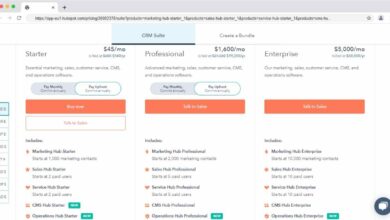
For example, HubSpot’s free CRM is powerful, but advanced reporting and sequences require paid upgrades. Pipedrive starts at $14.90/user but charges more for AI features and phone support.
Always request a detailed quote based on your expected usage.
CRM Buying Checklist – CRM Buying Checklist menjadi aspek penting yang dibahas di sini.
Factor in Implementation and Maintenance Costs
TCO includes:
- Onboarding and data migration services.
- Customization (workflows, dashboards, branding).
- Ongoing training and support.
- Integration development (if APIs aren’t plug-and-play).
Some vendors offer flat-fee implementation packages. Others charge hourly, which can add up quickly. Consider DIY options if you have in-house tech skills, but don’t underestimate the time investment.
“The cheapest CRM can become the most expensive if it requires constant fixes and workarounds.”
7. Test, Trial, and Evaluate Before Committing
Never buy a CRM based on brochures alone. Your CRM Buying Checklist isn’t complete without hands-on testing. Most vendors offer free trials—use them wisely.
Run a Pilot Program with Real Data
Select a small team (5–10 users) and run a 2–4 week pilot. Import real contacts, simulate sales processes, and test key workflows.
- How long does it take to log a call?
- Can marketing launch a campaign from the CRM?
- Does customer service resolve tickets faster?
Collect feedback daily. Use surveys to rate ease of use, speed, and feature satisfaction.
Compare Vendors Side-by-Side
Create a scoring matrix based on your CRM Buying Checklist criteria. Rate each vendor on:
- Features (30%)
- Usability (20%)
- Integration (15%)
- Security (10%)
- Support (10%)
- Price (15%)
Weight the categories based on your priorities. A sales-heavy team might prioritize features and usability, while a regulated industry might weight security higher.
Tools like G2 Crowd and Capterra provide real user reviews to supplement your evaluation.
What is a CRM Buying Checklist?
CRM Buying Checklist – CRM Buying Checklist menjadi aspek penting yang dibahas di sini.
A CRM Buying Checklist is a structured guide that helps businesses evaluate and select the right Customer Relationship Management (CRM) system by assessing goals, features, integration, security, cost, and user adoption.
How long should a CRM trial last?
A CRM trial should last at least 14 days to allow sufficient time for data migration, user training, and workflow testing. For complex implementations, extend to 30 days.
Can small businesses benefit from a CRM?
Absolutely. Modern CRMs like HubSpot and Zoho offer free or low-cost plans tailored for small businesses, helping them automate tasks, track leads, and improve customer retention.
What’s the most common CRM mistake?
The most common CRM mistake is choosing a system based on features alone without considering user adoption, leading to low usage and wasted investment.
Is cloud-based CRM secure?
Yes, reputable cloud-based CRMs use advanced encryption, regular security audits, and compliance certifications to protect data, often more securely than on-premise systems.
CRM Buying Checklist – CRM Buying Checklist menjadi aspek penting yang dibahas di sini.
Selecting the right CRM is a strategic decision that impacts every customer-facing team. By following this comprehensive CRM Buying Checklist—defining goals, assessing team needs, evaluating features, ensuring integration, prioritizing security, analyzing costs, and testing thoroughly—you’ll avoid costly mistakes and choose a system that drives real growth. The best CRM isn’t the most expensive or feature-packed—it’s the one that fits your people, processes, and long-term vision.
Further Reading: