Running a small business is no small feat. Juggling leads, managing customer relationships, and keeping sales on track can feel overwhelming—especially when you’re doing it all with limited resources. That’s where CRM software for small business comes in, acting as your digital co-pilot to streamline operations, boost sales, and deliver exceptional customer experiences—all without breaking the bank.


Why CRM Software for Small Business Is a Game-Changer

Customer Relationship Management (CRM) software isn’t just for enterprise giants. In fact, small businesses that leverage CRM systems see up to 29% increase in sales performance, according to Nucleus Research. The right CRM software for small business can transform how you interact with customers, manage pipelines, and grow sustainably.
Boosting Sales Efficiency
One of the most immediate benefits of CRM software for small business is improved sales efficiency. Instead of relying on spreadsheets or memory, your team can track every lead, follow-up, and deal stage in one centralized system.
- Automated lead assignment ensures no opportunity slips through the cracks.
- Sales pipelines provide visual tracking of where each prospect stands.
- Task reminders and email integration keep your team proactive.
For example, a small e-commerce startup using CRM tools reported a 40% reduction in response time to customer inquiries, directly impacting conversion rates.
Enhancing Customer Retention
Acquiring a new customer can cost five times more than retaining an existing one. CRM software for small business helps nurture long-term relationships by storing customer preferences, purchase history, and communication logs.
“A satisfied customer is the best business strategy of all.” – Michael LeBoeuf
With detailed customer profiles, your team can personalize interactions, anticipate needs, and deliver timely support—key factors in building loyalty and repeat business.
Top 7 CRM Software for Small Business in 2024
Choosing the right CRM can be overwhelming with so many options available. To help you cut through the noise, we’ve analyzed the top 7 CRM platforms tailored for small businesses based on pricing, ease of use, scalability, and feature richness.
1. HubSpot CRM
HubSpot CRM stands out as one of the most user-friendly and powerful CRM software for small business. It’s completely free to start, making it ideal for startups and solopreneurs.
- Free plan includes contact management, deal tracking, email integration, and live chat.
- Seamless integration with HubSpot’s marketing, sales, and service hubs.
- Intuitive dashboard with drag-and-drop pipeline customization.
Its robust automation features allow small teams to scale without hiring additional staff. For more details, visit HubSpot CRM.
2. Zoho CRM
Zoho CRM is a versatile and affordable option that offers deep customization and AI-powered insights. It’s particularly popular among small businesses with diverse sales processes.
- Zia AI assistant provides predictive lead scoring and sales forecasting.
- Customizable workflows and approval processes.
- Strong mobile app for on-the-go access.
Pricing starts at $14/user/month, and Zoho frequently offers discounts for annual billing. Learn more at Zoho CRM.
3. Salesforce Essentials
For small businesses that plan to scale quickly, Salesforce Essentials brings enterprise-grade power to a smaller footprint.
- Cloud-based platform with real-time collaboration.
- Pre-built sales and support processes tailored for SMBs.
- Integration with over 1,000 third-party apps via AppExchange.
While slightly more expensive (starting at $25/user/month), its scalability makes it a smart long-term investment. Explore it at Salesforce Essentials.
4. Freshsales (by Freshworks)
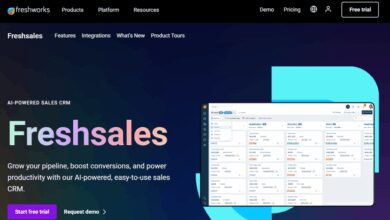
Freshsales is known for its modern interface and built-in phone and email capabilities, making it ideal for sales-driven small businesses.
- AI-based lead scoring and activity capture.
- Integrated phone, email, and chat within the CRM.
- Visual deal pipeline with timeline view.
Its free plan supports up to 10 users, and paid plans start at $15/user/month. Visit Freshsales for more.
5. Insightly
Insightly bridges the gap between CRM and project management, perfect for small service-based businesses like consultants, agencies, or contractors.
- Project and task management integrated with customer records.
- Workflow automation for repetitive tasks.
- Strong API for custom integrations.
Pricing starts at $29/user/month, with a limited free plan available. Check it out at Insightly.
6. Pipedrive
Pipedrive is built for sales-focused teams that want a visual, pipeline-driven approach. It’s one of the most intuitive CRM software for small business owners with little technical experience.
- Drag-and-drop sales pipeline with clear deal stages.
- Activity reminders and email tracking.
- Strong mobile app and calendar sync.
Plans start at $14.90/user/month, and it offers a 14-day free trial. Learn more at Pipedrive.
7. Agile CRM
Agile CRM combines CRM, marketing automation, and helpdesk features in one affordable package—ideal for small businesses wearing multiple hats.
- Free plan includes up to 10 users and basic automation.
- Website tracking and lead capture forms.
- Telephony integration and task management.
Paid plans start at $9.99/user/month. Visit Agile CRM for details.
Key Features to Look for in CRM Software for Small Business
Not all CRMs are created equal. When evaluating options, focus on features that align with your business goals, team size, and customer engagement model.
Contact and Lead Management
The foundation of any CRM is its ability to store and organize customer data. Look for tools that allow you to:
- Import contacts from email, spreadsheets, or social media.
- Tag and segment leads based on behavior or demographics.
- Track communication history (calls, emails, meetings).
A well-organized contact database ensures your team never starts a conversation from scratch.
Sales Pipeline Tracking
A visual sales pipeline helps you understand where each deal stands and forecast revenue more accurately.
- Customizable stages (e.g., Prospect, Demo, Proposal, Closed-Won).
- Drag-and-drop functionality for easy updates.
- Real-time reporting on pipeline health.
Tools like Pipedrive and HubSpot excel in this area, offering intuitive drag-and-drop interfaces.
Automation and Workflow Tools
Time is your most valuable resource. Automation reduces manual tasks and ensures consistency.
- Automated email sequences for lead nurturing.
- Task assignments based on deal stage or trigger events.
- Follow-up reminders and calendar syncing.
For example, Zoho CRM’s workflow rules can automatically assign a follow-up task when a lead opens a pricing email.
How to Choose the Right CRM Software for Small Business
Selecting the right CRM isn’t just about features—it’s about fit. A tool that works for a 5-person startup might not suit a 20-person agency. Here’s a step-by-step guide to help you decide.
Assess Your Business Needs
Start by identifying your pain points. Are you losing leads? Struggling with follow-ups? Need better reporting? Map these to CRM capabilities.
- Sales teams need pipeline visibility and email tracking.
- Service teams benefit from ticketing and knowledge bases.
- Marketing teams require lead scoring and campaign tracking.
Be honest about what you need now—and what you might need in 6–12 months.
Consider Ease of Use and Onboarding
A powerful CRM is useless if your team won’t use it. Look for platforms with:
- Intuitive user interfaces.
- Onboarding tutorials and customer support.
- Mobile accessibility.
HubSpot and Pipedrive are known for their user-friendly designs, reducing training time and resistance to adoption.
Check Integration Capabilities
Your CRM shouldn’t live in isolation. It should connect with tools you already use, such as:
CRM Software for Small Business – CRM Software for Small Business menjadi aspek penting yang dibahas di sini.
- Email platforms (Gmail, Outlook).
- Calendar apps (Google Calendar, Outlook).
- Accounting software (QuickBooks, Xero).
- Marketing tools (Mailchimp, Facebook Ads).
Most top CRMs offer native integrations or API access. For instance, Salesforce integrates with over 1,000 apps, while Zoho CRM works seamlessly within the Zoho ecosystem.
Implementing CRM Software for Small Business: Best Practices
Rolling out a new CRM requires more than just technical setup—it’s a change management process. Follow these best practices to ensure a smooth transition.
Start Small and Scale Gradually
Don’t try to migrate all your data and automate every process on day one. Begin with core functions like contact management and lead tracking.
- Import essential customer data first.
- Train your team on basic navigation and data entry.
- Gradually add automation and advanced features.
This phased approach reduces overwhelm and increases adoption rates.
Train Your Team Effectively
Even the best CRM software for small business fails without proper training. Invest time in onboarding sessions, FAQs, and ongoing support.
- Host live training workshops or use video tutorials.
- Appoint a CRM champion within the team.
- Encourage feedback and address concerns promptly.
According to Salesforce, companies that provide CRM training see 3x higher user adoption rates.
Maintain Data Quality
Garbage in, garbage out. A CRM is only as good as the data it contains. Establish rules for data entry and regular audits.
- Standardize naming conventions (e.g., First Last vs. Last, First).
- Set required fields for new contacts (e.g., phone, source).
- Schedule monthly data cleanup sessions.
Tools like HubSpot offer data quality reports to identify duplicates and missing information.
Measuring the ROI of CRM Software for Small Business
Investing in CRM software should yield measurable returns. Track key performance indicators (KPIs) to evaluate its impact.
Sales Growth and Conversion Rates
Compare sales figures and conversion rates before and after CRM implementation.
- Are you closing more deals?
- Is your sales cycle shorter?
- Are leads converting faster?
For example, a small B2B service provider saw a 35% increase in conversions within three months of using Zoho CRM.
Customer Satisfaction and Retention
Use surveys, Net Promoter Score (NPS), and repeat purchase rates to gauge customer experience improvements.
- Are customers responding faster to outreach?
- Is support resolution time improving?
- Are retention rates climbing?
A well-maintained CRM enables personalized service, directly impacting satisfaction.
Team Productivity and Time Savings
Track how much time your team saves on administrative tasks.
- Automated follow-ups reduce manual emailing.
- Centralized data eliminates time spent searching for info.
- Task management keeps everyone aligned.
One study found that CRM users save an average of 4.5 hours per week on sales-related tasks.
Common Mistakes to Avoid When Using CRM Software for Small Business
Even with the best tools, mistakes can derail your CRM success. Be aware of these common pitfalls.
Poor Data Entry and Incomplete Records
If your team skips filling out key fields or enters inaccurate data, the CRM becomes unreliable.
- Enforce mandatory fields for critical information.
- Use dropdowns and picklists to reduce errors.
- Regularly audit and clean up old or duplicate records.
Automated data capture (like email tracking) can help reduce manual input.
Over-Customization
While customization is powerful, overdoing it can make the system complex and hard to maintain.
- Stick to essential custom fields and workflows.
- Avoid creating too many deal stages or user roles.
- Test changes in a sandbox before going live.
Remember: simplicity drives adoption.
Lack of Ongoing Maintenance
A CRM isn’t a “set it and forget it” tool. It requires regular updates, training, and optimization.
- Schedule quarterly reviews of CRM usage and performance.
- Update integrations and security settings.
- Gather user feedback for continuous improvement.
Without maintenance, your CRM can become outdated and underutilized.
What is the best CRM software for small business with a free plan?
HubSpot CRM offers the most robust free plan, including contact management, deal tracking, email integration, and live chat. It’s ideal for startups and small teams looking to get started without upfront costs. Zoho CRM and Agile CRM also offer free tiers with solid features.
How much does CRM software for small business typically cost?
Prices vary widely, but most small business CRMs range from $10 to $50 per user per month. Some, like HubSpot and Agile CRM, offer free plans. Others, like Salesforce Essentials, start at $25/user/month. Many providers offer discounts for annual billing.
Can CRM software help with marketing and customer service?
Yes, many modern CRM platforms include marketing automation (email campaigns, lead nurturing) and customer service tools (ticketing, knowledge bases). HubSpot, Zoho CRM, and Freshsales are strong examples of all-in-one solutions.
Is it hard to switch CRM software once you’ve started using one?
Switching is possible but requires planning. Most CRMs allow data export and import, though formatting may need adjustment. It’s best to choose a scalable CRM early to minimize future migration efforts.
Do I need technical skills to use CRM software for small business?
No, most CRM software for small business is designed for non-technical users. Platforms like HubSpot, Pipedrive, and Zoho CRM feature intuitive interfaces, drag-and-drop builders, and extensive support resources.
Choosing the right CRM software for small business can be a transformative decision. From boosting sales and improving customer retention to streamlining operations and enhancing team productivity, the benefits are clear. The key is to select a platform that fits your current needs, supports future growth, and is embraced by your team. Whether you start with a free tool like HubSpot or invest in a scalable solution like Salesforce, the journey toward better customer relationships begins with the first click. Take the time to evaluate, implement thoughtfully, and measure results—your business will thank you.
CRM Software for Small Business – CRM Software for Small Business menjadi aspek penting yang dibahas di sini.
Further Reading: