Want to unlock the full potential of LinkedIn for sales? LinkedIn Sales Navigator isn’t just another tool—it’s your secret weapon for finding, engaging, and closing high-value prospects with precision and professionalism.
What Is LinkedIn Sales Navigator and Why It Matters

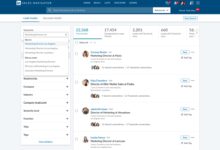
LinkedIn Sales Navigator is a premium sales tool designed specifically for professionals who want to leverage LinkedIn’s vast network for B2B lead generation and relationship building. Unlike the standard LinkedIn experience, Sales Navigator offers advanced search filters, lead recommendations, real-time insights, and direct InMail access—making it an essential asset for modern sales teams.
Core Features That Set It Apart
Sales Navigator goes beyond basic profile browsing. It enables users to identify decision-makers, track company updates, and receive alerts when prospects change jobs or post relevant content. These features empower sales professionals to engage at the right moment with the right message.
- Advanced lead and account search filters
- Real-time sales insights and updates
- InMail messaging credits for direct outreach
- Lead and account recommendations based on AI
“LinkedIn Sales Navigator has transformed how we prospect. It’s like having a radar for high-intent buyers.” — Sales Director, Tech SaaS Company
Who Should Use LinkedIn Sales Navigator?
Sales Navigator is ideal for B2B sales professionals, recruiters, business development managers, and consultants. Whether you’re in tech, finance, healthcare, or professional services, if your sales cycle involves building relationships with individuals on LinkedIn, this tool is built for you.
- Sales reps in enterprise and mid-market companies
- Recruiters sourcing passive talent
- Startup founders handling their own outreach
- Freelancers and consultants targeting corporate clients
Even marketing teams use Sales Navigator to understand buyer personas and support lead nurturing campaigns. Its versatility makes it one of the most widely adopted sales tools in the LinkedIn ecosystem.
How LinkedIn Sales Navigator Boosts Lead Generation
One of the biggest challenges in B2B sales is finding qualified leads. LinkedIn Sales Navigator solves this by offering granular search capabilities that go far beyond job titles and locations. You can filter by company size, industry, function, seniority, and even groups they’re part of.
Advanced Search Filters for Precision Targeting
The platform allows you to create highly specific lead lists. For example, you can search for “Marketing Directors at SaaS companies with 200–500 employees in Germany” and get accurate results in seconds. This level of targeting reduces wasted effort and increases conversion rates.
- Filter by years of experience and job changes
- Target by company growth trends and funding status
- Use relationship filters (2nd-degree connections, alumni, etc.)
These filters are powered by LinkedIn’s massive professional database, which includes over 900 million users across 200+ countries. When combined with Sales Navigator’s AI-driven suggestions, you’re not just searching—you’re discovering high-potential prospects you might never have found otherwise.
Saving Leads and Accounts for Ongoing Tracking
Once you find a promising lead or company, you can save them to your CRM-like workspace. Sales Navigator sends real-time alerts when a saved lead changes jobs, gets promoted, shares content, or engages with your posts. This enables timely, context-rich outreach.
- Get notified about job changes and promotions
- Monitor company news and funding rounds
- Track engagement with your content
This proactive monitoring turns passive prospecting into active relationship management. According to LinkedIn, users who save leads are 3x more likely to convert them into opportunities.
Mastering InMail: The Direct Messaging Advantage
InMail is one of the most powerful features of LinkedIn Sales Navigator. Unlike connection requests, which can be ignored or declined, InMail allows you to send direct messages to anyone on LinkedIn—even if you’re not connected.
How InMail Credits Work
Each Sales Navigator subscription includes a set number of InMail credits per month. These credits are used whenever you send a message to someone outside your network. Unused credits typically roll over for one month, depending on your plan.
- Team plans offer shared credit pools
- Credits are only deducted when the recipient opens the message
- You can track open and response rates in the dashboard
This pay-per-engagement model ensures you’re not wasting resources on undelivered messages. It also encourages thoughtful, personalized outreach rather than mass spamming.
Writing High-Converting InMail Messages
The key to successful InMail is personalization and relevance. A generic “Hi, I’d like to connect” message has a low response rate. Instead, top performers use insights from the prospect’s profile, recent activity, or company news to craft compelling messages.
- Reference a recent post or job change
- Mention a shared connection or alma mater
- Offer value upfront (e.g., a relevant resource)
“Personalization isn’t optional—it’s the price of entry. The best InMails feel like a warm introduction, not a cold call.” — Top 1% LinkedIn Sales Navigator User
A/B testing subject lines and message length can also improve performance. LinkedIn reports that InMails with personalized subject lines have a 30% higher open rate.
Integrating LinkedIn Sales Navigator with CRM Systems
To maximize efficiency, Sales Navigator integrates seamlessly with leading CRM platforms like Salesforce, HubSpot, and Microsoft Dynamics. This integration ensures that lead data flows smoothly between systems, reducing manual entry and improving data accuracy.
Sales Navigator for Salesforce
The official Sales Navigator for Salesforce integration allows users to view LinkedIn profiles, save leads, and log activities directly within Salesforce. This eliminates context switching and keeps all sales intelligence in one place.
- View LinkedIn insights without leaving Salesforce
- Sync saved leads and accounts automatically
- Log InMail and connection requests as CRM activities
This integration is especially valuable for enterprise sales teams that rely on Salesforce for pipeline management. It turns LinkedIn data into actionable CRM records.
HubSpot and Microsoft Dynamics Integrations
For companies using HubSpot, the integration enables bi-directional syncing of contacts and companies. You can enrich HubSpot records with LinkedIn data and trigger workflows based on Sales Navigator alerts.
- Enrich CRM records with real-time LinkedIn data
- Automate follow-ups based on job changes
- Align sales and marketing teams with shared insights
Microsoft Dynamics users benefit from similar functionality through the LinkedIn Sales Navigator add-in. These integrations ensure that no matter which CRM you use, LinkedIn’s intelligence is never siloed.
Leveraging TeamLink for Warm Introductions
One of Sales Navigator’s most underrated features is TeamLink. This allows you to see your teammates’ 2nd and 3rd-degree connections, giving you access to a much wider network than your own.
How TeamLink Expands Your Reach
Imagine you’re trying to reach a CMO at a Fortune 500 company. With TeamLink, you might discover that a colleague in your sales team went to the same university as the prospect. That shared connection becomes a powerful warm introduction.
- See which teammates are connected to your target leads
- Request introductions through internal messaging
- Collaborate on outreach strategies
According to LinkedIn, outreach via a mutual connection has a 4x higher response rate than cold outreach. TeamLink turns your entire sales organization into a network amplifier.
Best Practices for Using TeamLink Effectively
To get the most out of TeamLink, encourage your team to keep their LinkedIn profiles updated and connected. Regular internal syncs can help identify high-priority prospects and coordinate warm introductions.
- Host weekly TeamLink review meetings
- Train new hires on internal networking protocols
- Use TeamLink data to prioritize outreach sequences
When used strategically, TeamLink can significantly reduce sales cycles and improve win rates.
Account-Based Selling with LinkedIn Sales Navigator
Account-based selling (ABS) is a strategic approach where sales and marketing teams focus on a defined set of target accounts. LinkedIn Sales Navigator is perfectly suited for ABS, offering tools to identify, track, and engage multiple stakeholders within a single organization.
Building Target Account Lists
You can create and save lists of target companies based on criteria like industry, revenue, employee count, and growth indicators. Sales Navigator then provides insights into key decision-makers, recent hires, and organizational changes.
- Identify multiple stakeholders (economic buyers, champions, influencers)
- Track company milestones like funding rounds or expansions
- Monitor employee sentiment through shared content
This holistic view enables multi-threaded outreach, which is critical for complex B2B sales cycles.
Engaging Multiple Stakeholders
In enterprise sales, decisions are rarely made by one person. Sales Navigator allows you to map out the buying committee and engage each member with tailored messaging.
- Send personalized InMails to different roles
- Use content sharing to build credibility
- Track engagement across multiple contacts
By nurturing relationships with multiple stakeholders simultaneously, you increase your chances of winning the deal.
Measuring Success: Analytics and Reporting in Sales Navigator
Like any sales tool, the value of LinkedIn Sales Navigator depends on how well you measure and optimize its use. The platform includes built-in analytics to track performance and identify areas for improvement.
Key Metrics to Monitor
Sales Navigator provides insights into your outreach effectiveness, including InMail open and response rates, lead conversion rates, and engagement trends.
- InMail open and reply rates
- Number of leads saved and converted
- Top-performing search queries
- Team activity and credit usage
These metrics help you refine your messaging, targeting, and follow-up strategies. For example, if your InMail response rate is below 15%, it may be time to revisit your personalization approach.
Using Data to Optimize Your Strategy
Regularly reviewing your analytics allows you to identify patterns and replicate success. Top users often conduct monthly audits of their Sales Navigator activity to adjust their tactics.
- Identify which industries or titles respond best
- Test different messaging templates
- Optimize timing and frequency of outreach
LinkedIn also provides benchmark data so you can compare your performance against industry averages. This data-driven approach ensures continuous improvement.
What is the difference between LinkedIn Premium and LinkedIn Sales Navigator?
LinkedIn Premium is designed for job seekers and general professionals, offering features like profile views and basic search filters. LinkedIn Sales Navigator, on the other hand, is built for B2B sales professionals and includes advanced lead and account search, InMail credits, TeamLink, and CRM integrations. It’s far more powerful for lead generation and sales outreach.
Is LinkedIn Sales Navigator worth the cost?
For most B2B sales teams, yes. The average cost ranges from $79 to $119 per user per month, depending on the plan. When used effectively, the ROI can be substantial—many users report closing deals worth thousands or even millions of dollars through leads found on Sales Navigator.
Can I use LinkedIn Sales Navigator without a LinkedIn account?
No. You must have a LinkedIn account to use Sales Navigator. The tool is an add-on to your existing profile, enhancing it with sales-specific features. Your profile remains public, so it’s important to keep it professional and up to date.
How many InMail credits do I get per month?
The number of InMail credits depends on your subscription plan. The Professional plan includes 15 credits per month, while Team plans offer 25–50 credits per user, with shared pools available. Credits roll over for one month if unused.
Does LinkedIn Sales Navigator work for recruiters?
Absolutely. While it’s primarily marketed to sales professionals, recruiters use Sales Navigator to source passive candidates, send InMails, and track talent movement. The advanced filters and real-time alerts are just as valuable in talent acquisition as they are in sales.
LinkedIn Sales Navigator is more than just a tool—it’s a strategic advantage in the competitive world of B2B sales. From precise lead targeting and warm introductions via TeamLink to powerful CRM integrations and data-driven outreach, it equips professionals with everything they need to succeed. Whether you’re a solo entrepreneur or part of a large sales team, mastering Sales Navigator can dramatically improve your pipeline, shorten sales cycles, and increase revenue. The key is consistent, intelligent use—leveraging its full suite of features to build meaningful relationships, not just send messages.
Further Reading:
