In today’s fast-paced digital world, businesses are turning to WhatsApp CRM integration to supercharge customer engagement. It’s not just about messaging anymore—it’s about building relationships, automating support, and scaling sales—all from one powerful platform.

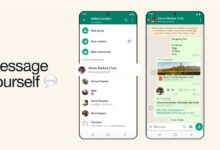


What Is WhatsApp CRM Integration?

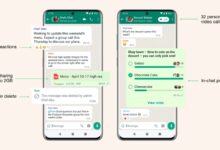
WhatsApp CRM integration refers to the seamless connection between WhatsApp, the world’s most popular messaging app, and Customer Relationship Management (CRM) systems. This integration allows businesses to manage customer interactions, automate responses, track conversations, and streamline sales and support processes—all within a unified environment.
Defining CRM and WhatsApp’s Role
A CRM system is designed to store customer data, track interactions, and manage relationships across the customer lifecycle. Traditionally, CRMs have relied on email, phone calls, and web forms. However, with over 2.7 billion users globally, WhatsApp has become a dominant communication channel, especially in emerging markets like India, Brazil, and Indonesia.
Integrating WhatsApp into a CRM transforms how companies communicate. Instead of switching between apps, teams can send, receive, and log messages directly from their CRM dashboard. This eliminates data silos and ensures every conversation is tracked and actionable.
How Integration Works Technically
WhatsApp CRM integration typically works through APIs (Application Programming Interfaces). The WhatsApp Business API, available through Meta-approved solution providers like Twilio, MessageBird, or 360Dialog, allows businesses to connect their CRM systems to WhatsApp at scale.
When a customer sends a message, the API routes it to the CRM, where it’s logged under the customer’s profile. Agents can reply directly from the CRM, and automated workflows—like welcome messages or order updates—can be triggered based on user behavior or CRM data.
“The integration of WhatsApp with CRM systems is not just a trend—it’s a strategic shift toward conversational commerce.” — TechCrunch, 2023
Types of CRM Systems That Support WhatsApp
Not all CRMs are created equal when it comes to WhatsApp integration. However, leading platforms have adapted quickly:
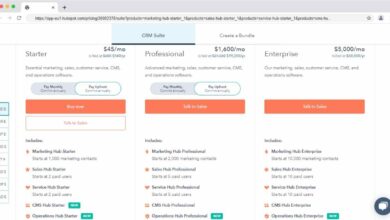
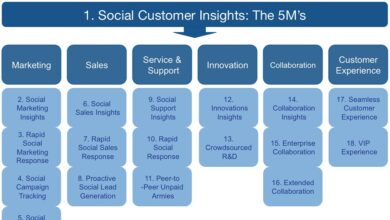
Salesforce: Offers native integration via Salesforce Service Cloud and Marketing Cloud, allowing agents to manage WhatsApp conversations alongside other support channels.HubSpot: Integrates with WhatsApp through third-party tools like Respond.io or Landbot, enabling marketing automation and chatbot workflows.Zoho CRM: Provides direct WhatsApp integration via Zoho Cliq and third-party connectors, supporting both sales and support use cases.Microsoft Dynamics 365: Supports WhatsApp via Power Automate and partner solutions, ideal for enterprise-level customer service.
.Pipedrive and Freshsales: Use API-based connectors to sync WhatsApp messages with deal stages and customer profiles.Why WhatsApp CRM Integration Is a Game-Changer
The fusion of WhatsApp with CRM systems is more than a technical upgrade—it’s a transformation in customer experience.Businesses that adopt WhatsApp CRM integration report higher engagement, faster response times, and improved customer satisfaction..
Real-Time Customer Engagement
Unlike email, which can take hours or days to get a response, WhatsApp boasts a 98% open rate and an average response time of under 90 seconds. When integrated with a CRM, every message becomes part of a real-time conversation thread tied to a customer’s history.
For example, if a customer messages, “Where’s my order?” the CRM can instantly pull up their purchase history, shipping details, and past support tickets, allowing agents to respond accurately and instantly.
Eliminating Communication Silos
Without integration, customer messages on WhatsApp often live in isolation—separate from sales records, support logs, and marketing data. This leads to fragmented experiences, duplicated efforts, and missed opportunities.
With WhatsApp CRM integration, every interaction is automatically logged and linked to the customer’s profile. Whether it’s a sales inquiry, a complaint, or a feedback message, it’s all centralized. This ensures continuity, especially when multiple team members handle different aspects of the customer journey.
Driving Higher Conversion Rates
Conversational selling is on the rise, and WhatsApp is at the forefront. A study by Gartner (2023) found that businesses using WhatsApp for sales saw a 35% higher conversion rate compared to traditional email campaigns.
CRM integration amplifies this by enabling personalized outreach. Sales teams can trigger WhatsApp messages based on CRM triggers—like a customer abandoning a cart or reaching a milestone in the sales funnel. These timely, relevant messages significantly boost the chances of conversion.
7 Key Benefits of WhatsApp CRM Integration
The advantages of integrating WhatsApp with your CRM go far beyond convenience. Here are seven powerful benefits that can transform your business operations.
1. Enhanced Customer Support Efficiency
Customer service teams can respond faster and more accurately when all WhatsApp conversations are embedded in the CRM. Support agents no longer need to switch between apps or manually log tickets.
Automated responses can handle common queries—like business hours or return policies—while complex issues are escalated to the right agent with full context. This reduces resolution time and improves first-contact resolution rates.
2. Automated Workflows and Chatbots
One of the most powerful features of WhatsApp CRM integration is automation. Businesses can set up chatbots to handle routine tasks such as:
- Sending order confirmations
- Providing shipping updates
- Answering FAQs
- Scheduling appointments
- Collecting feedback post-purchase
These bots pull data directly from the CRM, ensuring responses are personalized. For instance, a chatbot can say, “Hi John, your order #12345 is out for delivery today,” instead of a generic message.
3. Centralized Customer Data
Every WhatsApp message becomes a data point in the CRM. Over time, this builds a rich, 360-degree view of each customer, including their preferences, purchase history, support interactions, and communication style.
This centralized data enables better segmentation, targeted marketing, and proactive service. For example, if a customer frequently asks about product upgrades, the CRM can flag them as a high-potential lead for the sales team.
4. Improved Sales Pipeline Management
Sales teams can use WhatsApp CRM integration to track leads from initial contact to closing. When a prospect messages via WhatsApp, the CRM automatically creates a lead, assigns it to a sales rep, and logs all subsequent conversations.
This visibility helps managers monitor pipeline health, identify bottlenecks, and forecast revenue more accurately. It also ensures no lead falls through the cracks due to missed messages.
5. Scalable Communication for Growing Businesses
Small businesses might manage WhatsApp manually, but as they grow, manual handling becomes unsustainable. WhatsApp CRM integration allows companies to scale their communication without hiring dozens of agents.
With automation, one agent can manage hundreds of conversations. Messages are routed to the right person, and bots handle repetitive tasks, freeing up human agents for complex issues.
6. Increased Customer Retention and Loyalty
Personalized, timely communication fosters loyalty. When customers feel heard and valued, they’re more likely to return.
CRM-integrated WhatsApp enables businesses to send personalized follow-ups, birthday wishes, loyalty rewards, and exclusive offers. These small touches, delivered at scale, significantly boost customer lifetime value (CLV).
7. Data-Driven Decision Making
With every interaction logged, businesses gain access to rich analytics. They can track metrics like:
- Response time
- Conversation volume
- Customer satisfaction (via post-chat surveys)
- Conversion rates from WhatsApp leads
- Most common customer queries
This data informs strategy—helping companies optimize their messaging, improve service quality, and refine their sales approach.
Top Use Cases of WhatsApp CRM Integration
WhatsApp CRM integration isn’t just for large enterprises. Businesses across industries are leveraging it in creative and impactful ways.
E-Commerce and Order Management
Online retailers use WhatsApp CRM integration to provide real-time order updates. When a customer places an order, an automated message confirms it. As the order ships, another message with a tracking link is sent.
If a customer messages, “My package hasn’t arrived,” the CRM pulls up the shipping details and allows the agent to respond instantly. This reduces support tickets and improves customer trust.
Customer Onboarding and Support
SaaS companies use WhatsApp to guide new users through onboarding. After signup, a welcome message with tutorial links is sent. If the user has questions, they can reply directly and get help without leaving the app.
The CRM tracks onboarding progress and flags users who haven’t completed key steps, enabling proactive outreach.
Sales Lead Generation and Nurturing
Real estate agents, education providers, and B2B companies use WhatsApp to nurture leads. For example, a real estate agency can send property listings via WhatsApp based on a lead’s preferences stored in the CRM.
Follow-up messages are automated, and sales reps are alerted when a lead shows high engagement—like clicking on a listing or asking for a site visit.
How to Implement WhatsApp CRM Integration
Implementing WhatsApp CRM integration requires careful planning and execution. Here’s a step-by-step guide to get you started.
Step 1: Choose the Right CRM Platform
Not all CRMs support WhatsApp natively. Start by evaluating your current CRM. If it doesn’t offer direct integration, look for third-party tools that bridge the gap.
Popular integration platforms include:
- Twilio WhatsApp API
- MessageBird
- 360Dialog
- Respond.io
- Z-API
Ensure the platform supports your CRM and offers features like message templates, automation, and analytics.
Step 2: Apply for WhatsApp Business API Access
To use WhatsApp for business at scale, you need access to the WhatsApp Business API. This is not available directly from WhatsApp but through official Business Solution Providers (BSPs).
The application process typically involves:
- Registering your business
- Verifying your phone number
- Setting up a business profile
- Submitting message templates for approval (e.g., shipping updates, appointment reminders)
Approval can take a few days to a few weeks, depending on the provider and region.
Step 3: Connect CRM to WhatsApp via API
Once approved, you’ll receive API credentials. Use these to connect your CRM to WhatsApp. Most integration platforms offer pre-built connectors for popular CRMs.
For custom setups, you may need a developer to configure webhooks, authentication, and data mapping. Ensure that customer data flows securely between systems and complies with GDPR or other privacy regulations.
Step 4: Design Automated Workflows
Map out key customer journeys and design automation rules. For example:
- If a new lead is added to CRM → Send welcome message via WhatsApp
- If order status changes to “shipped” → Send tracking link
- If customer messages “support” → Assign to support queue and send acknowledgment
Use chatbot builders (like Landbot or Chatfuel) to create interactive flows with buttons, quick replies, and forms.
Step 5: Train Your Team and Monitor Performance
Train your sales, support, and marketing teams on how to use the integrated system. Emphasize response protocols, message tone, and escalation procedures.
Monitor key metrics like response time, conversation volume, and customer satisfaction. Use insights to refine workflows and improve service quality.
Challenges and How to Overcome Them
While WhatsApp CRM integration offers immense benefits, it’s not without challenges. Being aware of these hurdles helps you plan better.
Compliance and Privacy Concerns
WhatsApp has strict policies on data privacy and spam. Businesses must obtain customer consent before messaging them. Unsolicited messages can lead to account suspension.
Solution: Always use opt-in mechanisms—like checkboxes on forms or QR code scans. Clearly communicate how WhatsApp will be used and allow customers to unsubscribe easily.
Message Template Approval Delays
Every automated message (e.g., shipping updates) must be submitted as a template and approved by WhatsApp. This process can be slow and requires precise wording.
Solution: Prepare templates in advance. Follow WhatsApp’s guidelines strictly—avoid promotional language in service messages. Use neutral, helpful tones.
Integration Complexity for Legacy Systems
Older CRM systems may lack API support or require custom development to integrate with WhatsApp.
Solution: Consider upgrading to a modern CRM or using middleware platforms like Zapier or Make (formerly Integromat) to bridge the gap.
Future Trends in WhatsApp CRM Integration
The landscape of WhatsApp CRM integration is evolving rapidly. Here are key trends shaping the future.
Rise of AI-Powered Conversational Agents
AI chatbots are becoming smarter, thanks to advances in natural language processing (NLP). Future integrations will enable bots to understand context, sentiment, and intent—providing near-human support.
For example, if a customer says, “I’m frustrated with my order,” the bot can detect frustration and escalate to a human agent with context.
Deeper E-Commerce and Payment Integration
WhatsApp is expanding its commerce features, including in-app payments (via partners like Stripe and JioPay). CRM integration will soon allow businesses to take orders, process payments, and deliver receipts—all within a single chat.
This turns WhatsApp into a full-fledged sales channel, tightly linked to CRM data for inventory and customer tracking.
Advanced Analytics and Predictive Engagement
Future CRM systems will use AI to predict when a customer is likely to need support or make a purchase. These predictions will trigger proactive WhatsApp messages.
For instance, if a customer’s subscription is about to expire, the CRM can send a renewal offer via WhatsApp—increasing retention rates.
Best Practices for Maximizing WhatsApp CRM Integration
To get the most out of your integration, follow these best practices.
Personalize Every Message
Use CRM data to personalize messages. Include the customer’s name, recent purchase, or location. Personalization increases engagement and builds trust.
Set Clear Response Expectations
Let customers know when to expect a reply. Use automated messages like, “Thanks for your message! We’ll respond within 15 minutes.” This manages expectations and improves satisfaction.
Monitor and Optimize Continuously
Regularly review conversation logs, response times, and customer feedback. Identify bottlenecks and refine workflows. A/B test message templates to see what works best.
Respect Customer Preferences
Not all customers want to be contacted via WhatsApp. Respect opt-outs and offer alternative channels. This builds trust and compliance.
What is WhatsApp CRM integration?
WhatsApp CRM integration connects the WhatsApp messaging platform with a Customer Relationship Management (CRM) system, allowing businesses to manage customer conversations, automate responses, and track interactions directly within their CRM.
Which CRMs support WhatsApp integration?
Major CRMs like Salesforce, HubSpot, Zoho CRM, and Microsoft Dynamics 365 support WhatsApp integration, either natively or through third-party tools like Twilio, MessageBird, or Respond.io.
Is WhatsApp CRM integration secure?
Yes, when implemented correctly. WhatsApp uses end-to-end encryption, and CRM integrations should comply with data protection regulations like GDPR. Always use trusted solution providers and secure APIs.
Can small businesses benefit from WhatsApp CRM integration?
Absolutely. Small businesses can use integration to scale customer service, automate follow-ups, and improve sales without hiring large teams. Many tools offer affordable plans for startups and SMEs.
How much does WhatsApp CRM integration cost?
Costs vary based on message volume, CRM platform, and provider. WhatsApp charges per conversation (e.g., $0.005 to $0.01 per message), and CRM tools may have monthly fees. Many providers offer free tiers for low-volume usage.
WhatsApp CRM integration is no longer a luxury—it’s a necessity for businesses aiming to deliver fast, personalized, and scalable customer experiences. From automating support to driving sales and building loyalty, the integration unlocks powerful capabilities. By choosing the right tools, following best practices, and staying compliant, businesses of all sizes can harness the full potential of conversational CRM. The future of customer engagement is here, and it’s running on WhatsApp.
Further Reading: